Is iPhone 6s SIM Free? Everything You Need to Check
If you’re considering an iPhone 6s SIM free, it’s important to understand what “SIM-free” really means and how activation works. An unlocked iPhone 6s allows you to choose your pre...
Quincy D.-Mar 02, 2026
Image by Unsplash
Table of Contents
If you’re considering an iPhone 6s SIM free, it’s important to understand what “SIM-free” really means and how activation works. An unlocked iPhone 6s allows you to choose your preferred carrier without being tied to a contract. However, it requires a physical Nano-SIM since it does not support eSIM technology. For activation tips, carrier compatibility details, and affordable wireless plan options, explore helpful resources from TAG Mobile to learn more.
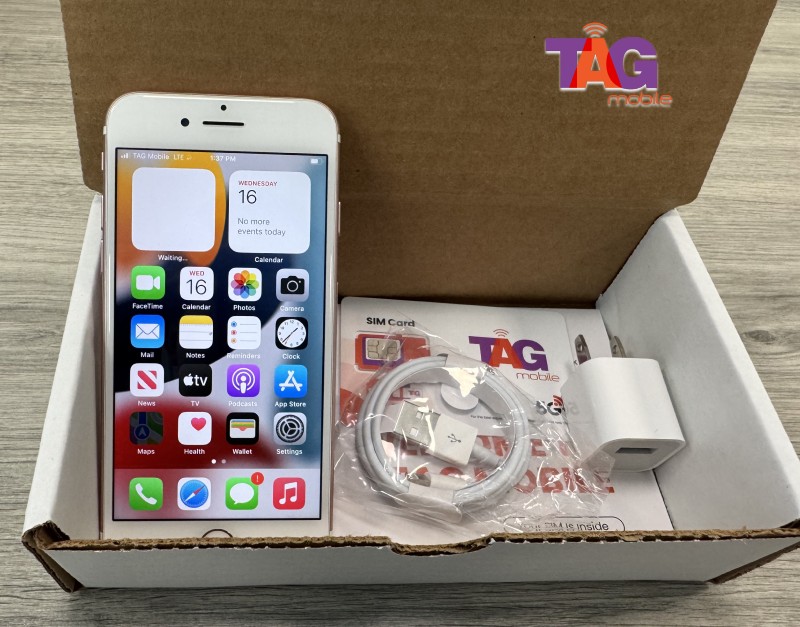
An iPhone 6s SIM-free (also called unlocked) device is a 4.7-inch smartphone with a 12MP rear camera, originally released in 2015. Being “SIM free” means the phone is not tied to any specific carrier and can be used with compatible networks without long-term contracts or carrier restrictions. It was typically available in 16GB, 32GB, 64GB, and later 128GB storage options, depending on the market.
The iPhone 6s supports a physical Nano-SIM card, allowing users to insert a SIM from most compatible GSM carriers. However, it does notsupport eSIM technology, as digital SIM functionality was introduced in later iPhone models. This means activation requires a physical SIM card rather than a digital download setup.
Is iPhone 6s SIM free? Get to know the SIM card support on Apple iPhone 6s. (Image by Unsplash)
Before activating service, it’s helpful to understand exactly what type of SIM the iPhone 6s supports. Knowing the correct iPhone 6s sim card size ensures you avoid compatibility issues during setup.
Uses Physical Nano-SIM
The iPhone 6s relies on a physical Nano-SIM card for cellular connectivity. This is the smallest traditional SIM format and must be inserted into the SIM tray for the phone to connect to a mobile network. If you are switching from an older device that uses a Micro-SIM or Standard SIM, you may need a replacement Nano-SIM from your carrier.
Does NOT Support eSIM
Unlike newer iPhone models, the iPhone 6s does not support eSIM technology. All activation must be completed using a physical SIM card. Digital SIM downloads or QR code activation are not available on this device.
No Dual SIM Support
The iPhone 6s supports only one active SIM at a time. Because it lacks eSIM capability and only includes a single Nano-SIM tray, Dual SIM functionality is not available on this model.
SIM Tray Location
On the right side of the gadget is the SIM tray. A tiny paperclip inserted into the tiny pinhole or a SIM eject tool can be used to open it. Once removed, place the Nano-SIM carefully into the tray and slide it back into the phone securely for activation.
If you have purchased an unlocked device, the setup process is simple but must be completed correctly. When you own an iPhone 6s SIM free, you are responsible for inserting a compatible SIM card and activating service with your chosen carrier.
Step 1: Insert the Nano-SIM Card
The iPhone 6s requires a physical Nano-SIM card for activation.
First, locate the SIM tray on the right edge of the phone.
Use a SIM eject tool or a small paperclip to gently press into the pinhole and remove the tray.
Carefully place the Nano-SIM into the tray in the correct orientation, then slide it back into the device securely.
Make sure the tray sits flush with the frame to avoid detection issues.
Step 2: Turn on the iPhone
Next, press and hold the side power button until the Apple logo appears on the screen. Once the device boots up, it will display the Hello setup screen. You will then be asked to select your language and region before continuing.
Step 3: Connect to a Wi-Fi Network
When prompted, connect the device to a stable Wi-Fi network. While some carriers allow cellular activation directly through the inserted SIM, Wi-Fi ensures that Apple’s activation servers can verify the device quickly. A strong internet connection helps prevent activation delays.
Step 4: Complete the Activation Process
Follow the on-screen instructions to continue the setup. The system will attempt to detect your Nano-SIM and confirm carrier compatibility. Because the device is unlocked, activation should proceed without restrictions. If your carrier requires additional verification, you may receive a short confirmation message.
Step 5: Test Calls and Mobile Data
Once setup is complete, check the signal indicator at the top of the screen. Place a test call to confirm the voice service is active. Then open Safari or another app that uses mobile data to ensure your data connection is working properly. If you experience any issues, restarting the phone or reinserting the SIM often resolves minor connectivity problems.
4. Looking for an Affordable Phone With Service Included?
If you’re searching for a budget-friendly smartphone and dependable service without paying high upfront costs, assistance programs may offer a practical solution. Instead of purchasing a device separately and then adding an expensive monthly plan, eligible users may qualify for both a phone and service bundled together.
Depending on current availability, some iPhone options may include:
TAG Mobile also supports eSIM activation on compatible devices. In many cases, when you apply and are approved for a device through TAG, your phone may arrive with a pre-activated eSIM, meaning your service is already installed before you even turn it on. This eliminates the need to insert a physical SIM card or manually configure network settings. Simply power on the device, complete the basic setup steps, and start making calls, sending texts, and using mobile data almost immediately.
Apply for the best phone at the best values for you.
5. Final Words
Choosing an iPhone 6s SIM free gives you the flexibility to select the carrier and plan that best fits your needs without being tied to a contract. While this older model relies on a physical Nano-SIM and does not support eSIM, it can still function well with compatible networks. The key is pairing your unlocked device with reliable service and clear activation guidance.
If you’re considering an upgrade or looking for affordable wireless options, explore plan choices and compatible devices from TAG Mobile. Staying connected should be simple, flexible, and budget-friendly.
Notice: The government does not cover device costs, only basic service through Lifeline. Any free or discounted devices, upgrades, or top-ups are limited-time TAG Mobile offers and may vary by state, eligibility, and availability. Terms and conditions apply.
Share
TAG Blog
Stories, guides, and helpful updates for staying connected.