Free Laptop to Work From Home: Verified Options for Low-Income Americans
The shift toward remote employment has transformed the way Americans earn a living, yet the cost of hardware remains a hurdle. If you are searching for a free laptop to work from h...
Quincy D.-Feb 28, 2026
Image by Unsplash
Table of Contents
The shift toward remote employment has transformed the way Americans earn a living, yet the cost of hardware remains a hurdle. If you are searching for a free laptop to work from home, you are likely looking for a way to achieve digital equity.
Fortunately, programs like Lifeline provide a foundation for connectivity. Exploring these verified options can empower you to secure the tools necessary for a successful remote career without the heavy financial burden.
For many households, the most reliable path to getting a free laptop to work from home begins with the Lifeline program. Lifeline is a federal assistance program created to make phone and internet service more affordable for eligible low-income individuals.
To help bridge the digital divide, many approved Lifeline providers now offer devices, including smartphones, tablets, and sometimes laptops, at no or low cost as part of enrollment promotions. These device offers help users access remote jobs, online training, telehealth, and everyday digital services.
These programs are designed to help households that struggle with the high costs of technology and connectivity. Statistics show that roughly 15% of US households lack a computer, a gap that disproportionately affects low-income communities.
Securing a free laptop to work from home often begins with verifying your eligibility:
The most straightforward way to qualify for digital assistance is through participation in existing federal programs. If you or a member of your household receives benefits from the Supplemental Nutrition Assistance Program (SNAP), Medicaid, or Supplemental Security Income (SSI), you are likely eligible for Lifeline-related support. Other qualifying programs include Federal Public Housing Assistance (FPHA) and the Veterans Pension or Survivors Pension.
Income-Based Eligibility Guidelines
If you do not participate in the programs listed above, you can still qualify based on your annual earnings. Generally, households with an income at or below 135% of the Federal Poverty Guidelines meet the requirements. TAG Mobile makes this process simple by allowing you to submit digital copies of pay stubs or tax returns to verify your financial status.
If you do not participate in the programs listed above, you can still qualify based on your annual earnings. (Image by Unsplash)
One Benefit Per Household Rule
It is important to remember the “one benefit per household” rule. This federal regulation stipulates that only one Lifeline benefit (either a phone or internet discount) is allowed per household. If multiple people at the same address share income and expenses, they are considered a single household and must share the benefit.
2. Step-by-Step: How to Start Working From Home With Lifeline Support
Transitioning to a remote career requires a stable internet connection and a reliable device. Following a clear path can help you secure these essentials through the Lifeline Program.
Step 1: Check Eligibility & Choose TAG Mobile
The first step is to confirm that you qualify based on your household income or participation in a government program such as Medicaid, SNAP, or SSI. Tribal residents can also qualify through specific Tribal assistance programs.
Choosing a trusted provider like TAG Mobile is essential, as they specialize in helping low-income individuals navigate the application process to get connected quickly.
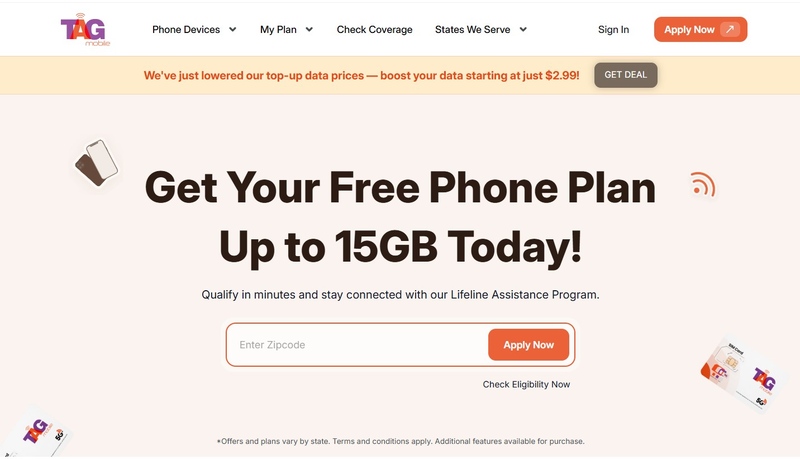
Go to tagmobile.com and enter your ZIP code and email to see which plans you qualify for in your area. Review the available Lifeline packages, which often include a free/discounted device with free monthly talk, text, and data necessary for communicating with employers and attending virtual interviews.
TAG Mobile’s official website
Next, you‘ll pick a free device, such as a basic smartphone, or explore upgrade options for more advanced hardware. If you already have a phone, you can use the Bring Your Own Device (BYOD) option.
While many applicants search for a free laptop to work from home, laptop inventory is typically limited and can go out of stock quickly due to high demand. If laptops are unavailable at the time of application, you can select alternative devices such as a smartphone or tablet, which still provide reliable access to job platforms, video calls, and other essential online tools.
Step 3: Submit Your Application
You may then be required to upload digital copies of your government-issued ID and proof of eligibility, such as a benefit award letter or proof of income. TAG Mobile’s secure portal ensures your information is handled professionally.
Step 4: Get Connected & Start Working From Home
Once approved, you will receive your device or activated SIM card shipped to your door, typically within 7 to 10 business days. With a reliable connection, you can begin searching for remote roles, accessing online training, and managing your daily work tasks. Staying connected is the foundation of digital equity and career growth.
Notice: The government does not cover device costs, only basic service through Lifeline. Any free or discounted devices, upgrades, or top-ups are limited-time TAG Mobile offers and may vary by state, eligibility, and availability. Terms and conditions apply.
3. Common Scams to Avoid When Searching for Free Laptops
The high demand for a free laptop to work from home has, unfortunately, led to an increase in online scams targeting vulnerable populations. Protecting your personal information is just as important as finding a device.
“Guaranteed Free Laptop” Red Flags
Be wary of websites that guarantee a free laptop to work from home without requiring any proof of eligibility or income. Legitimate government-supported programs will always require a formal application through the National Verifier. If a site asks for an “upfront shipping fee” via gift cards or wire transfers, it is a major red flag for a scam.
How to Spot Legit Programs
Legitimate programs are usually affiliated with the FCC or recognized non-profits. Verified Lifeline providers like TAG Mobile have clear contact information, transparent privacy policies, and do not use high-pressure sales tactics. Always check for the official Lifeline or government logos before sharing sensitive data like your Social Security number.
4. FAQs About Free Laptop to Work From Home
Navigating government programs can be complex, and many applicants have similar questions regarding the availability of hardware.
Can I get a free laptop directly from the Lifeline program?
The Lifeline Program itself provides a monthly discount on service rather than hardware. However, the government works with providers to offer devices. While smartphones are the most common free device, some regional initiatives may offer discounts on larger electronics.
Does TAG Mobile provide free laptops?
Currently, TAG Mobile focuses on providing high-quality smartphones and reliable wireless service to eligible customers. These phones are equipped with data capabilities, allowing you to use them as a mobile hotspot to connect a computer or tablet for your work-from-home needs.
What if I don’t own a laptop right now?
If you currently lack a computer, a smartphone, or a tablet, TAG Mobile can serve as a bridge. You can use the device to apply for jobs and even perform basic tasks. Additionally, many communities offer “Computer Refurbish” programs for those who are already enrolled in Lifeline or SNAP.
Is there a one-per-household rule?
Yes, the federal government strictly enforces the one-benefit-per-household rule. This ensures that the program can reach as many families as possible. If you attempt to sign up for multiple Lifeline benefits at the same address, your application will likely be denied.
Final Words
The transition to remote work requires a stable internet connection and a functional device. While searching for a free laptop to work from home, remember that verified Lifeline support is your most reliable path to achieving digital independence. Accessing these essential services ensures you are always ready for your next big job opportunity. Join TAG Mobile today to claim your Lifeline benefits!
Share
TAG Blog
Stories, guides, and helpful updates for staying connected.