Free Government Tablet Sign Up: How Low-Income Americans Can Apply Today
Closing the digital divide is essential for success in today’s world. For many low-income households, the cost of technology remains a significant barrier. Fortunately, a free gove...
Quincy D.-Jan 29, 2026
Image by Unsplash
Table of Contents
Closing the digital divide is essential for success in today’s world. For many low-income households, the cost of technology remains a significant barrier. Fortunately, a free government tablet sign up can provide the necessary tools to stay connected with family, healthcare, and career opportunities.
By leveraging federal support like Lifeline through TAG Mobile, you may be eligible for a device offer depending on provider promotions and availability. Ready to see how this program can change your daily life?
Yes, eligible low-income households can receive technology assistance through federal initiatives. While TAG Mobile is widely known for providing free smartphones, many applicants search for a free government tablet sign up to enhance their digital access. The primary vehicle for these benefits is the Lifeline Program, a government service designed to make communication services affordable for families and individuals with limited financial resources.
TAG Mobile serves as a trusted provider in this space, offering access to service and device offers through provider programs to those who meet the strict federal requirements. By participating in this program, you can receive not only a device but also a monthly service plan that includes data, talk, and text. This ensures that financial barriers do not prevent you from accessing work opportunities, healthcare, or education.
Free government tablet sign up – is it possible? (Image by Unsplash)
To successfully complete a free tablet sign up and receive your device, you must meet specific and clearly defined eligibility criteria established by federal guidelines. There are two primary ways to qualify: through your existing participation in certain government assistance programs or based solely on your total annual household income.
2.1 Qualifying Through Government Assistance Programs
The fastest way to sign up for free government tablet benefits is through existing participation in federal aid programs. You are likely eligible if you or a member of your household receives:
SNAP (EBT/Food Stamps): Assistance for purchasing nutritious food.
Medicaid: Health coverage for low-income families.
Supplemental Security Income (SSI): Support for seniors and those with disabilities.
Federal Public Housing Assistance (FPHA): Aid for residents in subsidized housing.
Veterans Pension and Survivors Benefit: Support for eligible veterans.
2.2 Qualifying Based on Household Income
Even if you are not currently enrolled in a federal program, your household income may still make you eligible for these benefits. Typically, households earning at or below 135% of the Federal Poverty Guidelines can qualify for the program.
TAG Mobile makes the verification process easy by accepting various forms of proof, such as recent tax returns, consecutive pay stubs, or official Social Security statements, to confirm your financial status securely.
2.3 One Benefit Per Household Rule
It is important to remember that federal rules allow only one Lifeline benefit per household. This means everyone living at the same address who shares income can only have one discounted service or free device. If another member of your home already receives these benefits, your application for a free government tablet sign up may be denied.
The application process with TAG Mobile is designed to be straightforward and user-friendly, but it does require careful attention to detail and proper documentation. Follow these three clear steps to complete your enrollment without delay.
Step 1: Check Your Eligibility
Before proceeding with the application, it is important for the applicants to ensure that they qualify for the Lifeline program. The applicants qualify for the program if they participate in government programs such as SNAP, Medicaid, SSI, and Federal Public Housing Assistance.
For those who do not participate in these programs, they qualify for the program if their household income is at or below 135% of the Federal Poverty Guidelines. It is important to ensure that the applicants qualify for the program before proceeding with the application to avoid interruptions in the application process.
Step 2: Visit TAG Mobile’s Website
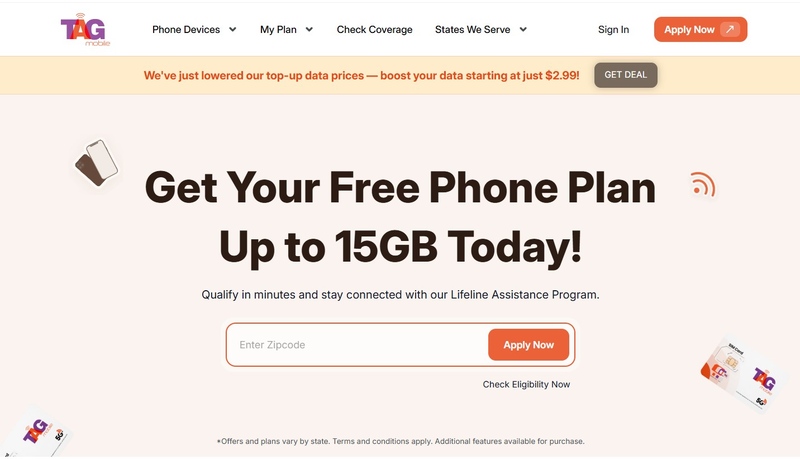
Once your eligibility is checked, you’ll visit the official TAG Mobile website to begin your application by entering your ZIP code and email. TAG Mobile is a trusted Lifeline provider offering nationwide coverage and dedicated customer support for eligible low-income households.
This step allows you to choose a Lifeline plan that best fits your needs. These plans are designed to significantly reduce your monthly phone bill and, in many cases, provide service at no cost.
Step 4: Choose Your Tablet or BYOD Options
Next, you select a free or discounted device from TAG Mobile or choose the Bring Your Own Device (BYOD) option if you already have a compatible tablet. This flexibility allows you to continue using a device you’re comfortable with.
Step 5: Upload Documents (If Required)
At this step, you’ll have to upload clear and legible copies of your government-issued photo ID and proof of eligibility if required, such as a benefit award letter. Ensuring your documents are complete and easy to read helps prevent processing delays.
Step 6: Submit Application & Wait for Approval
Review your information carefully, then submit your application. TAG Mobile will verify your details and notify you once your Lifeline enrollment has been approved.
Step 7: Receive Your Tablet
After approval, your tablet (or phone if you change your mind) will be shipped to the address you provided. Once received, you can activate your service and start enjoying lower monthly phone costs.
4. What Happens After Free Government Tablet Sign Up and Approval?
The application process with TAG Mobile is designed to be straightforward and user-friendly, but it does require careful attention to detail and proper documentation. Follow these three clear steps to complete your enrollment without delay.
4.1 Tablet Availability and Shipping
Once you receive your final approval notification, TAG Mobile will immediately begin processing your request based on current device inventory and state-specific offers. If a tablet is part of the current offer in your area and is in stock, it will be packaged and shipped directly to the home address you provided during sign-up. Most approved users receive their new devices within just a few business days, allowing them to get online almost immediately.
4.2 Status Checking
If you are eager to know when your device will arrive, you can typically check the real-time status of your application and shipment through the secure TAG Mobile online portal. Should there be any issues with your documentation or shipping address, the TAG Mobile support team will reach out to help you resolve the matter quickly so your service isn’t delayed.
Final Words
Completing a free government tablet sign up is a vital step toward achieving digital independence for low-income Americans. By understanding the eligibility rules and following the application steps with TAG Mobile, you can gain access to the tools needed for modern life. Remember to recertify your eligibility annually to keep your benefits active and stay connected to the opportunities that matter most.
Notice: The government does not cover device costs, only basic service through Lifeline. Any free or discounted devices, upgrades, or top-ups are limited-time TAG Mobile offers and may vary by state, eligibility, and availability. Terms and conditions apply.
Share
TAG Blog
Stories, guides, and helpful updates for staying connected.