

Why Is My Hotspot Slow? Find the Bottleneck and Speed It Up
A strong cellular signal does not always guarantee a fast hotspot connection. The question why is my hotspot slow often comes down to factors like network traffic, limited hotspot data, Wi-Fi bands, distance, or multiple connected devices.
Finding the specific cause makes it easier to restore a faster, more reliable connection.
1. Why Is My Hotspot Slow? 8 Common Reasons
Slow tethering usually comes from either the cellular connection feeding the hotspot or the local Wi-Fi link between your phone and connected devices. Checking both sides of that connection makes it easier to find the slowdown and apply the right fix.
1. Weak Cellular Signal
Poor cellular reception limits the amount of data your phone can receive before it even reaches the hotspot connection. When asking why is my hotspot so slow, check whether mobile data itself feels sluggish with Wi-Fi turned off.
Move closer to a window, go outdoors, or change locations to improve reception. If signal strength remains weak, the hotspot cannot deliver speeds faster than the phone’s underlying cellular connection.
2. Cellular Network Congestion
Crowded cellular networks can slow mobile data during busy periods, even when signal bars look strong. This often happens in dense neighborhoods, events, transportation hubs, or peak evening hours when many people use the same nearby towers.
Test the hotspot at another time or location. If speeds improve significantly, congestion is likely the cause rather than your phone settings or laptop.
3. Too Many Devices Are Connected
Every device connected to your hotspot competes for the same mobile-data connection. Streaming, cloud backups, downloads, or video calls on one device can leave much less bandwidth for the others.
Disconnect devices you are not actively using and test the connection again. When troubleshooting why is my mobile hotspot so slow, reducing simultaneous users is one of the fastest ways to see whether bandwidth sharing is the problem.
4. You Have Reached a Data or Hotspot Limit
Some wireless plans include a specific amount of high-speed tethering data. Once that allowance is reached, the carrier may slow hotspot speeds, restrict tethering, or require additional data depending on the plan.
Review your account or plan details to check remaining hotspot allowance. If performance dropped suddenly after heavy use, data limits may explain the slowdown more accurately than any device setting.
5. Your Phone Is Too Far From the Connected Device
Distance weakens the Wi-Fi link between your phone and laptop, tablet, or other connected device. Walls, floors, furniture, and other obstacles can reduce signal strength further, especially when using the 5 GHz band.
Move the phone closer and keep a clearer line of sight when possible. If speeds improved immediately, the cellular connection was likely fine, and the local Wi-Fi link was the bottleneck.
6. Wi-Fi Interference Is Slowing the Connection
Nearby routers, Bluetooth devices, smart-home equipment, and crowded Wi-Fi channels can interfere with hotspot performance. This is more noticeable in apartments, offices, or other places with many wireless networks operating at once.
Move away from heavily congested areas or switch hotspot bands if your phone supports it. Reducing nearby wireless interference can improve consistency even when your mobile-data speed does not change.
7. Your Hotspot Is Using the Wrong Wi-Fi Band for the Situation
Band choice matters because 2.4 GHz and 5 GHz behave differently. If the phone and laptop are close together, 5 GHz can provide better speed, while 2.4 GHz usually performs better over longer distances or through walls.
When investigating why is my hotspot slow, try switching bands rather than assuming one setting is always best. Matching the band to distance and surroundings can improve performance without changing your mobile plan.
8. Background Apps Are Using Bandwidth
Cloud backups, software updates, photo syncing, streaming apps, and automatic downloads can quietly consume bandwidth on either the phone or connected laptop. This can make everyday browsing feel slow even when the hotspot connection itself is working correctly.
Pause unnecessary downloads and close bandwidth-heavy apps while testing. Also check whether operating system updates or cloud services are running automatically in the background.
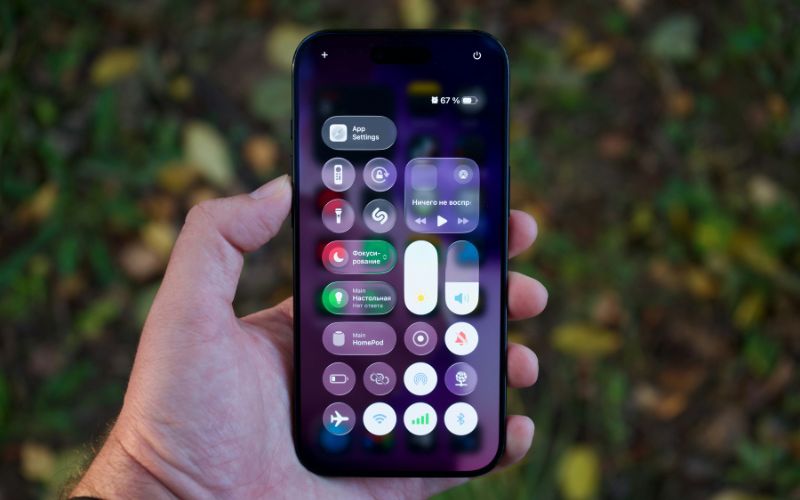
2. 2.4 GHz vs. 5 GHz: Which Is Faster for a Mobile Hotspot?
5 GHz usually delivers higher speeds at close range, while 2.4 GHz trades some speed for better reach and wall penetration. If you are asking why is my phone hotspot so slow, the wrong band for your location can be part of the problem.
| Factor | 2.4 GHz | 5 GHz |
| Speed | Generally slower | Generally faster |
| Range | Longer range | Shorter range |
| Walls and obstacles | Penetrates walls more effectively | Loses strength more quickly through walls |
| Interference | More prone to congestion from nearby devices | Usually less crowded |
| Best use | Longer distances or rooms with obstacles | Close-range streaming, downloads, and heavier tasks |
For a laptop sitting near the phone, 5 GHz is usually the better choice for speed. If the connected device is farther away or separated by walls, 2.4 GHz may provide a more stable connection even though its peak speed is lower.
>>> Read More: How to Change Hotspot Name on iPhone in a Few Simple Taps
3. Can Your Phone Plan Make Your Hotspot Slow?
Yes. Hotspot speed can drop when a plan reaches its high-speed limit, applies separate tethering rules, or reduces performance after heavy use. Checking plan terms is just as important as changing phone settings when slower speeds keep returning.
The Lifeline program, in case you have not known, helps eligible households reduce the cost of qualifying phone or internet service. Some participating service providers add their own extras beyond the federal benefit, including discounted devices, free delivery, and expanded communication features, depending on location and current offers.
TAG Mobile is one of those carriers, with current offering combines Lifeline-supported service with device choices, no-contract options, multilingual support, and discounted phones, which can make the program more practical for customers trying to lower monthly wireless costs.
Lifeline eligibility generally follows two paths: through household income at or below 135% of the Federal Poverty Guidelines, or through participation in approved programs such as Medicaid, SNAP, SSI, Federal Public Housing Assistance, and certain Tribal assistance programs.
TAG Mobile customers can claim qualifying plans with up to 16GB of free monthly data, unlimited talk and text, free delivery, and discounted phones, plus international calling to more than 200 countries and territories. (Exact service benefits can vary by state and area; and may subject to future updates)
Device selection is another part of the experience, especially for customers who want a newer smartphone for everyday mobile data use. You may check some of the most in-demand options here:
- iPhone XS: Apple smartphone with OLED display and familiar Apple interface, a practical option for users who prefer the iPhone ecosystem.
- Samsung Galaxy S20 5G: 5G-capable Android smartphone built for faster mobile connectivity. It can suit users looking for stronger performance within Samsung’s Galaxy lineup.
- FOXXD C67: Android smartphone designed for everyday communication and other routine mobile tasks. Its straightforward setup can work well for customers seeking a practical device without unnecessary complexity.
- iPhone 11: Apple smartphone offering a larger display, FaceTime, iMessage, photography, and broad iOS app support for everyday communication and entertainment.
- Samsung Galaxy S21 5G: 5G Android smartphone with strong performance for multitasking. Its newer Galaxy platform makes it suitable for users who want faster connectivity and a more capable daily device.
- TCL 20 SE: Large-screen Android smartphone that works well for routine online activities. Its bigger display can be useful for users who spend more time viewing content on their phone.

Note: Eligibility varies by state and program. Offers depend on availability and qualifications. TAG Mobile operates under the federal Lifeline Program as an Eligible Telecommunications Carrier (ETC). Service is non-transferable and limited to one service per household.
4. FAQs about Slow Hotspots
Hotspot speed can change depending on how many devices are connected, which Wi-Fi band is in use, and how your wireless plan handles tethering. These quick answers explain the most common performance differences and what usually causes them.
Does hotspot get slower with more devices?
Yes. Every connected device shares the same available cellular bandwidth, so speeds can drop as more laptops, tablets, or phones join. Heavy activities such as streaming, video calls, cloud backups, or large downloads can make the slowdown more noticeable.
Is 2.4 GHz or 5 GHz better for hotspot speed?
5 GHz is usually faster when the connected device is close to the phone, and there are few obstacles. 2.4 GHz generally offers better range and wall penetration, making it more suitable when the devices are farther apart.
Why is my hotspot slower than my phone data?
Your phone may receive fast cellular data while the hotspot connection adds another layer through Wi-Fi, device distance, interference, or tethering restrictions. Some plans also apply different speed limits to hotspot data than to regular phone use.
Does using too much hotspot data slow it down?
It can. Some wireless plans reduce tethering speeds after the included high-speed hotspot allowance is used, while others may stop hotspot access or require additional data. Checking your plan terms will show what happens after the limit is reached.
5. Final Thoughts
Slow tethering usually has a specific bottleneck, whether it comes from cellular coverage, Wi-Fi interference, device load, band selection, or plan limits. When checking why is my hotspot slow, testing each factor separately can reveal the cause without unnecessary resets. Small adjustments can often restore noticeably better performance. TAG Mobile gives eligible users another option to explore for Lifeline-supported wireless service and flexible data plans.
- Share This:
-

-

-

-

-


About the author
