

Free Laptop or Tablet: Legitimate Way to Get One Without Scams
Are you struggling to keep up with work or school because you lack a reliable computer? Digital equity is a major concern in the US, where millions of residents face challenges accessing the internet.
This guide explores the verified methods to obtain a free laptop or tablet through federal assistance programs. If you are looking for a trustworthy way to upgrade your tech without falling for common scams, you have come to the right place.
1. Can You Really Get a Free Laptop or Tablet?
Yes, you can. In many cases, eligible individuals may receive a free or low-cost laptop or tablet through programs like Lifeline or other assistance initiatives. While availability depends on providers, location, and eligibility requirements, these programs are designed to make technology more accessible for people who need it most.
Let’s explore how these options work and where you can find legitimate opportunities to get a device.
Who Offers Free or Low-Cost Devices
Many organizations aim to bridge the digital divide by providing technology to those in need. While some non-profits refurbish computers, the most reliable way to receive a free laptop or tablet is through certified telecommunications providers. These companies partner with federal initiatives to ensure low-income individuals have the tools necessary for modern life.
Government Programs That Help You Get a Device
The Lifeline Program is the primary federal initiative helping households afford communication services. While Lifeline historically focused on phone service, many providers now offer a free laptop or tablet or heavily discounted devices to eligible participants. By working with approved carriers like TAG Mobile, the government ensures that financial barriers do not prevent citizens from accessing the internet.
>>> Read more: Best Free Tablet With EBT: Eligibility Criteria & Application Process
2. Who Qualifies for a Free Laptop or Tablet through Lifeline Providers
Currently, the most reliable way to qualify for a free laptop or tablet is through the Lifeline program offered by approved Lifeline providers. Qualification is typically based on participation in certain government assistance programs or meeting income requirements
Qualifying Through Government Benefits
The easiest way to qualify for a free laptop or tablet is through participation in existing federal assistance programs. If you or a member of your household receives benefits from SNAP, Medicaid, SSI, or Federal Public Housing Assistance, you are likely eligible. Even those with Medicare may qualify if they meet specific household income rules.
Qualifying Based on Household Income
If you do not participate in the programs mentioned above, you can still qualify based on your earnings. Generally, households with an income at or below 135% of the Federal Poverty Guidelines meet the requirements for a free laptop or tablet. This ensures that seniors, students, and workers facing financial challenges can still obtain essential technology.
Documents You Need to Apply
To verify your eligibility, you must provide specific documentation during the application process. Common requirements include:
- An official letter confirming participation in a qualifying program like SNAP or Medicaid.
- Proof of income, such as recent pay stubs, tax returns, or Social Security statements.

3. How to Apply for a Free or Low-Cost Device
Applying for a free or low-cost laptop or tablet through a Lifeline provider is a straightforward process when you understand the required steps. The guide below walks you through the process step by step so you can apply with confidence and avoid unnecessary delays.
Step 1: Confirm Your Eligibility
The first and most critical step in securing a free laptop or tablet is verifying that you meet the federal requirements. Eligibility is generally based on participating in assistance programs like SNAP or Medicaid, or having a total household income that falls at or below 135% of the Federal Poverty Guidelines.
Taking this proactive step ensures you have the correct documentation ready, such as benefit award letters or tax returns, making the rest of the process much smoother and faster.
Step 2: Find a Legitimate Provider
Once you know you qualify, the next move is to select a reliable partner to handle your service. It is important to remember that not all telecommunications companies offer the same hardware or service quality, so choosing a certified Lifeline carrier is essential. A trusted provider like TAG Mobile specializes in helping low-income individuals bridge the digital divide.
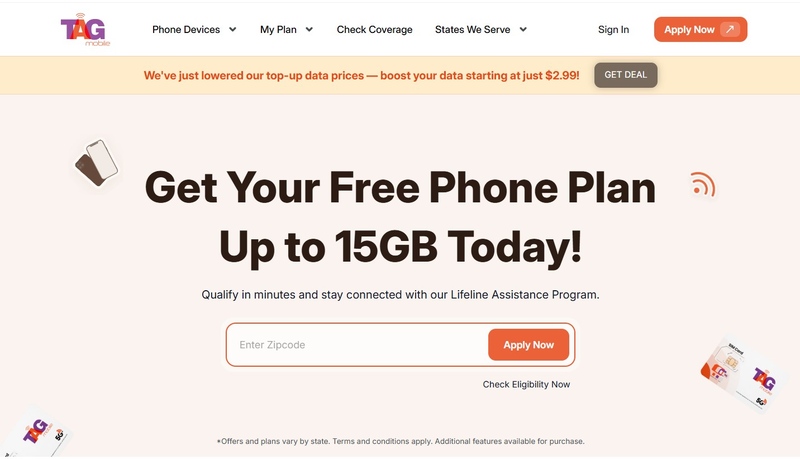
We simplify the process of obtaining a free laptop or tablet with our user-friendly platform. You’ll visit the official TAG Mobile website, enter your ZIP Code, and click “APPLY NOW” to see local offers.
Once your location is confirmed, you can select your plan from the available Lifeline packages.
Next, choose a free device if available. Popular options often include practical devices such as a Chromebook for everyday tasks like browsing, online classes, and document work, or tablets like the Samsung Galaxy Tab A7 Lite, which are well-suited for video calls, streaming, and mobile productivity. If your preferred device is unavailable, you can select an alternative option based on current inventory.
Click “SELECT NOW” to finalize your enrollment and schedule your device delivery.
Notice: The government does not cover device costs, only basic service through Lifeline. Any free or discounted devices, upgrades, or top-ups are limited-time TAG Mobile offers and may vary by state, eligibility, and availability. Terms and conditions apply.
Step 3: Complete the Application
With your eligibility confirmed and a provider chosen, you are ready to finalize your request. After selecting a plan and a device, you’ll be requested to fill out the formal application with your basic personal information and a valid shipping address. During this stage, you may also need to upload digital copies or clear photos of your verification documents. Most applications are processed quickly, often within a few business days.
Once approved, you will receive a notification, and your free laptop or tablet will be prepared for shipment, bringing essential technology right to your doorstep.
4. What to Expect After Approval
Once your application is approved, the process becomes much simpler as your provider prepares your device for delivery and activation.
Device Types You May Receive
The specific free laptop or tablet you receive often depends on current inventory and regional availability. While models vary, providers strive to supply reliable devices that support essential tasks like video conferencing, web browsing, and document editing.
Shipping, Setup, and Activation
After approval, your device will be shipped directly to your door at no cost. Most tablets and laptops come with a SIM card or activation instructions so you can start using your service immediately. There are typically no activation fees or hidden contracts when using a legitimate government-supported plan.
5. Common Problems and How to Avoid Scams
While many people successfully receive free or low-cost devices through Lifeline providers, the process can sometimes come with challenges or misleading offers.
Signs of Fake “Free Laptop” Offers
Protecting your personal information is just as important as finding a great deal. You should be extremely wary of advertisements or pop-up windows that demand upfront payments, “shipping fees,” or credit card information in exchange for a free laptop or tablet. Legitimate Lifeline providers like TAG Mobile operate under strict federal regulations and do not require credit checks, enrollment fees, or hidden deposits to get you started.
If an offer appears too good to be true, such as promising the latest high-end gaming laptop with no verification, or if it comes from an uncertified source, it is likely a scam designed to steal your identity or financial data. Always ensure you are on a secure, official website before sharing any sensitive details.
Application Issues and Solutions
Even with a legitimate provider, the path to obtaining your device can sometimes hit a few speed bumps. The most common delays occur during the verification phase; for instance, if your uploaded documents are blurry, expired, or missing key information. It is also vital to remember that federal rules strictly allow only one Lifeline benefit per household.
If another family member at your address is already receiving help, your application for a free laptop or tablet might be flagged. If you encounter these or other issues, TAG Mobile’s dedicated support team is available to help you resolve document errors, navigate the “one-per-household” worksheet, or even assist in transferring an existing benefit from another carrier so you can receive your new device without further delay.
Final Words
Technology is a powerful tool for education and employment, yet many households still face barriers to access. Obtaining a free laptop or tablet through verified providers like TAG Mobile offers a reliable solution for low-income residents. This program ensures that everyone has the hardware needed to succeed in an increasingly digital world.
Notice: The government does not cover device costs, only basic service through Lifeline. Any free or discounted devices, upgrades, or top-ups are limited-time TAG Mobile offers and may vary by state, eligibility, and availability. Terms and conditions apply.
- Share This:
-

-

-

-

-



About the author
