

Your Guide to Finding the Best Cafes With WiFi Near Me
Comfortable seating, dependable internet, and the right atmosphere can make a café ideal for work, study, or casual browsing. Searching for the best cafes with wifi near me involves comparing connection quality, power outlets, noise levels, opening hours, and overall comfort. The best choice should support productivity while still offering the relaxed setting that makes café time enjoyable.
1. What Makes a Cafe Worth Visiting for Wi-Fi?
Productive café time depends on more than simply getting online. While comparing the best cafes with wifi near me, look for a place that supports focus, comfort, and longer stays without making the experience feel inconvenient or distracting.
Reliable Wi-Fi Speed
Consistent internet performance matters most when you are working with cloud files, joining video meetings, researching, or uploading content. A worthwhile café should maintain a stable connection even during busy periods so you are not constantly reconnecting or waiting for pages to load.
Comfortable Seating
Good seating can make the difference between staying for twenty minutes and working comfortably for several hours. Chairs should offer enough support, while tables need sufficient space for a laptop, notebook, phone, and drink without making the setup feel crowded.
Accessible Power Outlets
Easy access to charging points becomes essential during longer sessions. Cafés with outlets near tables let you keep laptops, tablets, and phones powered without interrupting your workflow or moving seats halfway through the day just to find a place to plug in.
Manageable Noise Levels
Background chatter can create a pleasant atmosphere, but excessive noise quickly becomes distracting. Work-friendly cafés usually keep music and conversation at a manageable level, making it easier to write, read, study, or handle calls without struggling to concentrate.
Flexible Hours and Laptop-Friendly Policies
Convenient opening hours give you more freedom to work around your own schedule. It also helps when a café welcomes laptop users, does not impose overly restrictive time limits, and provides enough seating during peak periods for customers who plan to stay longer.

2. 10 Suggested Best Cafes With WiFi Near Me
Coffee shops can offer very different working environments, from lively community spaces to calmer corners suited to concentrated laptop sessions. The ten suggestions below span several U.S. cities, with a mix of strong coffee, comfortable settings, and work-friendly features worth considering.
Sightglass Coffee – San Francisco, CA
Address: 270 7th St, San Francisco, CA 94103
Sightglass Coffee’s SoMa flagship is known for its striking two-story roastery, open industrial design, communal seating, and carefully prepared specialty coffee. The spacious interior makes it appealing for meetings, reading, or spending time away from a traditional office.
Wi-Fi information for this location is inconsistent across current sources. Some work-café guides report Wi-Fi, while recent visitor-focused listings say the café has no Wi-Fi or outlets. If internet access is essential, verify directly with the café before planning a work session.
Verve Coffee Roasters – San Francisco, CA
Address: 2101 Market St, San Francisco, CA 94114
Verve Coffee Roasters on Market Street combines specialty drinks with a comfortable Castro setting that works particularly well for laptop users. Its couches, group tables, and generous working surfaces provide enough room for a computer, notebook, and coffee without feeling cramped.
Wi-Fi is available, which helps explain why the café appears on current San Francisco work-friendly coffee guides. Power access is more limited, however, so arriving with charged devices is wise if you expect to stay for several hours.
Devoción – New York City, NY
Address: 25 E 20th St, New York, NY 10003
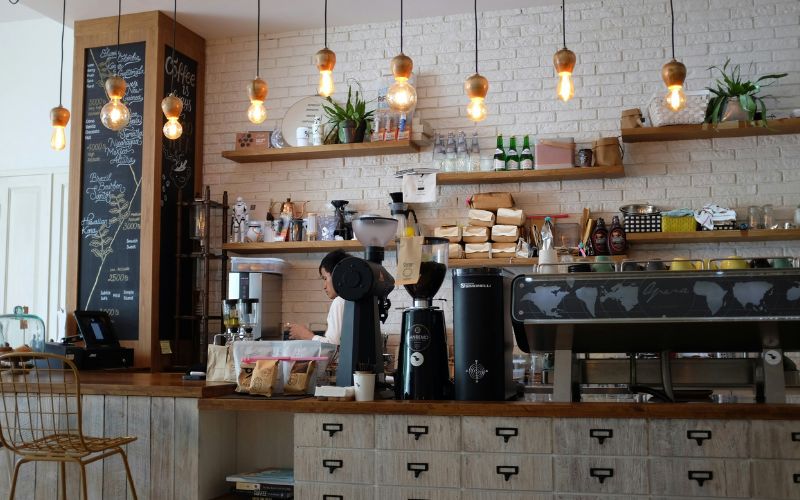
Devoción brings Colombian coffee and a polished, plant-filled aesthetic to New York, creating an inviting environment for a coffee break or laptop session. The East 20th Street location places customers conveniently in Manhattan, while the brand also operates other cafés across the city.
For longer work sessions, Devoción’s Williamsburg flagship is especially well documented for fast Wi-Fi, wall outlets, and spacious seating. That location can become crowded later in the morning, so early visits are generally better for focused work.
Think Coffee – New York City, NY
Address: 350 Broadway, New York, NY 10013
Think Coffee’s Broadway location offers a relaxed downtown setting for people who want to combine coffee with reading, writing, or everyday computer work. Large windows and a casual atmosphere make it easier to settle in without the rushed feeling of a small grab-and-go café.
Among the best cafes with wifi near me, Think Coffee can suit customers who prefer a familiar New York coffeehouse environment for short work sessions since seating and connectivity conditions can change during busy periods. Checking the location before an important call is sensible.
Dialog Cafe – Los Angeles, CA
Address: 3417 Motor Ave, Los Angeles, CA 90034.
Coffee Commissary’s Palms location offers a comfortable setting for anyone who wants to combine specialty coffee with a productive laptop session. Its relaxed neighborhood atmosphere and generous seating make it suitable for remote work, studying, or handling emails without feeling limited to a quick coffee stop.
Strong Wi-Fi is available across Coffee Commissary locations, while indoor and outdoor seating gives visitors more flexibility when staying for a while. The Palms branch currently operates daily, making it a practical California replacement for the temporarily closed Dialog Cafe.
Harun Coffee – Los Angeles, CA
Address: 4336 Degnan Blvd, Los Angeles, CA 90008
Harun Coffee brings a creative neighborhood feel to Leimert Park, pairing coffee with food and a stylish, community-focused setting. Its atmosphere works well for casual meetings, browsing, or spending time on a laptop while enjoying something beyond a typical chain-coffee experience.
Free Wi-Fi is currently listed among the café’s amenities, and Eater Los Angeles includes Harun among its recommended coffee shops with internet access. That combination makes it a practical option for both coffee lovers and remote workers.
Houndstooth Coffee – Austin, TX
Address: 11501 Rock Rose Ave #118, Austin, TX 78758
Houndstooth Coffee’s Rock Rose location offers a modern specialty-coffee setting in North Austin. Long operating hours and a polished environment make it convenient for customers who need somewhere to meet, read, or work between other plans throughout the day.
Current Austin café guides identify Houndstooth locations as work-friendly spaces with Wi-Fi, and the Rock Rose branch is specifically described as offering strong Wi-Fi and access to power. It can therefore work particularly well for longer laptop sessions.
Wandering Luna Brewtique – Burley, ID
Address: 400 Edgewater Dr, Burley, ID 83318
Wandering Luna Brewtique offers a smaller, more relaxed alternative to busy metropolitan coffee shops. Its neighborhood setting can appeal to customers who prefer an easygoing place for coffee, light food, online browsing, or a short period of focused work.
Current listings identify Wi-Fi among the café’s amenities, along with outdoor seating and parking. Hours are concentrated around mornings and early afternoons, so it works best for daytime study or remote-work sessions rather than late-evening productivity.
Lumière Coffee & Café – Branson, MO
Address: 114 N Commercial St, Branson, MO 65616
Lumière Coffee & Café provides a cozy downtown Branson stop for visitors who want coffee without stepping far away from the city center. Its welcoming atmosphere makes it suitable for catching up on messages, reviewing notes, or taking a quiet break between other activities.
Wi-Fi is currently listed as one of the café’s amenities, alongside indoor and outdoor options depending on conditions. Because it is a smaller local establishment, seating may vary, so flexible timing can make a work session more comfortable.
Ebenezer’s Coffeehouse – Washington, DC
Address: 201 F St NE, Washington, DC 20002
Ebenezer’s Coffeehouse sits near Union Station and combines a community-oriented identity with a convenient Capitol Hill location. Multiple seating areas make it useful for commuters, students, and remote workers who need somewhere to open a laptop before or after traveling through central Washington.
Current work-friendly café guides describe its Wi-Fi as dependable, while other listings also confirm free internet access. Outlet availability is more limited than seating, so choosing a wall or bar-area spot can be helpful during longer visits.
3. How to Find the Best Cafes With Wi-Fi Near Me
Good café hunting gets much easier when you know what to check before leaving home. A few simple search habits can help you compare internet access, seating, noise, and overall comfort instead of choosing a place based on coffee alone.
Use Google Maps With Specific Search Terms
You can use Google Maps to search phrases such as best cafes with wifi near me, “laptop-friendly coffee shop,” or “cafe with outlets” to narrow down suitable options. Compare several listings, browse photos, and read recent reviews for details about Wi-Fi reliability, seating, power outlets, noise levels, and peak hours before deciding where to go.
Read Recent Customer Reviews
Recent reviews often reveal details that official café pages do not mention. Look for comments from remote workers, students, or customers carrying laptops, especially those discussing connection speed, outlet availability, noise levels, or whether staff are comfortable with longer stays.
Check Photos Before You Go
Interior photos can tell you a lot about whether a café works well for productivity. Look for full-size tables, comfortable chairs, wall outlets, quieter corners, and enough spacing between seats. Small counter-only cafés may be excellent for coffee but less practical for extended laptop use.
Review Hours and Peak Times
Even a great work café can become difficult to use when every table is occupied. Check opening hours and popular times before visiting, then aim for quieter periods such as early mornings or mid-afternoons when seating and Wi-Fi demand may be more manageable.
Confirm Wi-Fi and Laptop Policies Directly
Policies can change, so call or message the café when internet access is essential for an important meeting or work session. Ask whether Wi-Fi is currently available, whether there are laptop restrictions during busy periods, and if outlets are accessible to customers.
>>> Also read: How to Clean a Coffee Grinder for Better-Tasting Coffee
4. What to Do If the Cafe Wi-Fi Is Slow
Slow café Wi-Fi does not always mean you need to pack up immediately. Even when searching for the best cafes with wifi near me, connection quality can change during busy hours, so a few quick adjustments may help restore a smoother connection.
- Move closer to the router: Signal strength can drop in corners, patios, or areas blocked by thick walls. Switching to a table nearer the main café area may improve stability.
- Disconnect unused devices: Phones, tablets, and laptops connected at the same time can compete for bandwidth. Turn off Wi-Fi on devices you are not actively using.
- Pause heavy downloads and cloud syncing: Large file transfers, backups, or automatic updates can consume bandwidth quickly. Stop them temporarily if you need better performance for browsing or video calls.
- Reconnect to the network: Turn Wi-Fi off and back on, then reconnect to the café network. This simple reset can sometimes fix temporary connection issues.
- Use your mobile hotspot: If the public network remains unreliable, switch to cellular data or a personal hotspot when your plan allows it. This is also a safer option for sensitive tasks such as banking or account logins.
- Avoid sharing sensitive information on public Wi-Fi: Even with a strong connection, public networks can carry security risks. Use HTTPS websites, avoid unfamiliar login pages, and consider a trusted VPN for additional protection.
- Visit during quieter hours: Network speeds often slow when many customers connect at once. Returning earlier in the morning or during off-peak hours may provide a faster, more stable experience.
5. FAQs about Finding Cafes With Wi-Fi
Café Wi-Fi can be convenient for work or study, but access rules and security vary from place to place. Knowing what to expect before connecting can help you avoid awkward moments and reduce unnecessary privacy risks.
Is cafe Wi-Fi usually free for customers?
Many cafés provide complimentary Wi-Fi for paying customers, but it is not guaranteed. Some locations may require a purchase, impose time limits, or offer internet access only during certain hours.
Should I ask for the Wi-Fi password when I order?
Yes, asking when you place your order is completely normal if the password is not displayed. Staff can also tell you whether the network has any time limits, login requirements, or restrictions on laptop use.
Is it safe to use public Wi-Fi for work?
Public Wi-Fi can be suitable for general browsing, but sensitive tasks require extra caution. Avoid entering financial or confidential information on unsecured networks, use HTTPS websites, and consider a trusted VPN or mobile hotspot for stronger protection.
What should I do if a cafe’s Wi-Fi requires a login?
Open your browser and follow the café’s official login page or captive portal instructions. If the page looks suspicious, requests unusual personal information, or fails to load correctly, confirm the network name with staff before entering any details.
Final Thoughts
Finding a café that works well for more than a quick coffee often comes down to the details: reliable internet, comfortable seating, accessible outlets, and an atmosphere where you can actually focus.
When narrowing down the best cafes with wifi near me, check recent reviews and current laptop policies rather than relying on Wi-Fi availability alone. Compare a few nearby options, then choose the spot that best matches how long you plan to stay and what you need to get done.
For more practical tips on staying connected and making the most of your mobile service, visit the TAG Mobile Blog. You can find helpful guides and everyday information on phones, connectivity, and wireless services.
- Share This:
-

-

-

-

-


About the author
