

Should I Convert to eSIM? The 2026 Pros and Cons Guide
Many smartphone users are now considering whether switching from a traditional SIM card to a digital one is the right move. If you’re wondering, should I convert to eSIM, it helps to understand how this technology works, what devices support it, and how activation typically happens through your carrier. eSIM can simplify switching plans, managing multiple lines, and setting up service without inserting a physical card.
Before considering this change, it is essential to know the compatibility and activation process. For a brief idea about the advantages, disadvantages, and activation process, refer to the following guide from TAG Mobile to determine if eSIM is the right choice for your device and service plan.
1. Should I Convert to eSIM?
The answer is, yes, it is always a good idea to switch to eSIM, especially if your smartphone supports it. This is because, with an eSIM, you will be able to activate your mobile service plan digitally, without the need for a physical SIM card. This is obviously easier and less risky, especially since there is always a risk of misplacing your small plastic SIM card.
Besides the ease of activation, another advantage that eSIM has over other types of SIM cards is that it is more flexible. This is because, with some smartphones, especially those that support dual SIM, you will be able to have multiple phone plans on your phone.
This is especially important if you want to have two phone plans, one for work and another for personal use. In addition, it is safer since it cannot be easily removed if your phone is stolen.
2. Advantages of Converting to eSIM
As mobile technology evolves, more smartphones now support digital SIM functionality alongside traditional SIM cards. If you’re asking, should I convert to eSIM? Understanding the practical advantages can help clarify why many users are making the switch.
Easier Carrier Switching
One of the most noticeable advantages of eSIM is how easily users can switch mobile carriers or plans. Instead of removing a SIM card and inserting a new one, most carriers allow customers to activate or transfer service digitally using a QR code or carrier app. This makes it much simpler to compare plans, change providers, or move your number to another network without handling physical hardware.
No Physical SIM Card Needed
Because an eSIM is built directly into the phone’s internal hardware, there is no need for a removable plastic SIM card. This eliminates common issues such as losing the card, damaging it, or needing a SIM ejector tool to access the tray. The embedded design also helps simplify device setup, since users can activate the service entirely through software settings.
Dual SIM Convenience
Many smartphones support Dual SIM functionality by combining a physical SIM with an eSIM or by allowing multiple eSIM profiles
This makes it easier to maintain two numbers on one device, such as separating personal and work lines. Travelers can also keep their main carrier active while adding a temporary local data plan, making international connectivity more convenient.
Faster Activation
Another key benefit for you to consider should I convert to eSIM will result in faster service activation. With a physical SIM, users often need to wait for shipping or visit a store to obtain a new card. With eSIM, activation typically happens digitally by scanning a QR code or downloading a carrier profile. In many situations, the entire process can be completed within minutes as long as the device is compatible and connected to Wi-Fi.
3. How to Convert Your SIM to eSIM
Should I convert to eSIM? Converting a physical SIM card to an eSIM allows your phone to activate cellular service digitally instead of relying on a removable SIM card. The process is usually quick, but the exact steps may vary depending on your device model and whether your carrier supports SIM-to-eSIM conversion.
On iPhone
If your carrier supports SIM conversion, many recent iPhone models allow users to move their existing cellular plan from a physical SIM to an eSIM directly through the phone’s settings.
- Open Settings: First, the user should unlock the iPhone and open the Settings app from the home screen. This menu contains all system controls, including the options needed to manage cellular service and SIM configurations.
- Tap Cellular (or Mobile Data): Inside the Settings menu, the user needs to select Cellular (sometimes labeled Mobile Data depending on region). This section displays your current mobile plan, network status, and SIM-related options.
- Choose “Convert to eSIM”: If the carrier supports this feature, the iPhone will display an option called Convert to eSIM under your active cellular plan. The user can tap this option to begin transferring the existing phone number and service from the physical SIM to a digital eSIM profile.
- Confirm the Conversion: The iPhone will then show instructions explaining the conversion process. The user should carefully review the information and tap Convert Cellular Plan to approve the change. During this step, the device communicates with the carrier to securely migrate the plan to the embedded SIM.
- Complete Activation: After confirmation, the iPhone automatically activates the eSIM profile. Once activation is complete, the physical SIM card will no longer be needed, and the user can remove it from the SIM tray if desired.
>>> Read More: Best Free eSIM Service for iPhone: Where to Find Them?
On Android
For Android phones such as Samsung Galaxy or Google Pixel devices, the conversion process typically involves downloading a digital SIM profile provided by the carrier. So, if you’re asking, should I convert to eSIM, this is the general conversion steps for your reference.
- Open Settings: The user should begin by opening the Settings app on the Android device. This section provides access to all network configuration tools needed to manage SIM cards and connectivity.
- Go to Network & Internet (or Connections): Next, the user needs to navigate to Network & Internet, Connections, or a similar section, depending on the phone brand. This menu controls mobile networks, Wi-Fi, and SIM management.
- Select SIMs or SIM Card Manager: Inside the network settings, the user should tap SIMs, Mobile Network, or SIM Card Manager. This area shows the currently active SIM card and provides options for adding or managing eSIM profiles.
- Tap Add eSIM or Download SIM: The device will display an option such as Add eSIM, Download SIM, or Add mobile plan. When the user selects this option, the phone prepares to install a digital SIM profile.
- Scan the Carrier QR Code: Most carriers provide a QR code or activation details to complete the setup. The user should scan the QR code with the phone’s camera and follow the on-screen instructions to download the eSIM profile.
- Confirm Activation: Once the digital profile downloads successfully, the Android device activates the eSIM and connects to the carrier network. At this point, the physical SIM card can usually be removed, and the phone will continue operating using the eSIM profile.
4. Thinking About eSIM? Your Device May Matter More Than You Think
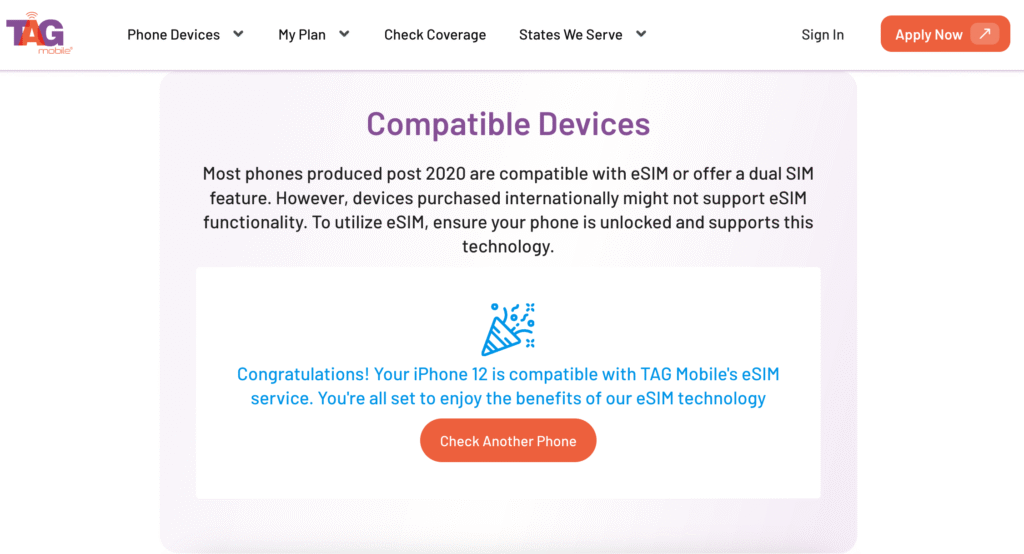
Making the transition to eSIM will greatly simplify your mobile services, and it all begins with one basic requirement: a compatible phone. Not all phones will be compatible with embedded SIM technology, and some phones may only be compatible with traditional SIM cards.
Before you make the transition, you should ensure your phone is compatible with eSIM and that your wireless carrier will be able to activate it on your particular phone.
If your current phone is not compatible with eSIM, you may want to consider upgrading your phone to make the transition easier. Some Lifeline wireless carriers, such as TAG Mobile, offer phones with eSIM compatibility as part of their services.
In some instances, phones will come with the eSIM already activated or ready to download, reducing the number of steps you need to take to make the transition.
If you qualify for the Lifeline plans through TAG Mobile, here are the benefits you can receive:
- Unlimited Talk and Unlimited Text
- Free International Calling to over 200 countries and territories
- Free Shipping
- Free Wifi-Calling
- Free 411 Directory Assistance
- Caller ID, Call Waiting, 3-Way Calling, Voicemail
- Nationwide Coverage
If you are considering converting to eSIM, reviewing compatible devices and available service options can help ensure a smoother activation experience. You can learn more about supported phones and eSIM setup by exploring the information provided by TAG Mobile HERE.
>>> Read more: Where Can You Get a Free Government Cell Phone?
5. Final Words
Deciding should I convert to eSIM often comes down to convenience, device compatibility, and how you prefer to manage your mobile service. For a lot of people, eSIM makes it much simpler to set up, change, and have multiple phone numbers without ever having to deal with a SIM card. As more and more phones and networks support digital SIM cards, this is becoming a viable choice in people’s lives.
If you’re considering getting this service, it would also be a good idea to check out the devices that are compatible with it, the process, and the plans that are available. For further information, you could check out TAG Mobile’s guide.
Notice: The government does not cover device costs, only basic service through Lifeline. Any free or discounted devices, upgrades, or top-ups are limited-time TAG Mobile offers and may vary by state, eligibility, and availability. Terms and conditions apply.
- Share This:
-

-

-

-

-



About the author
