

Best Cafes for Studying: Find the Right Spot for Every Study Session
Quiet surroundings, steady Wi-Fi, comfortable seating, and easy access to drinks can make a big difference during long study sessions.
The best cafes for studying balance focus with convenience, giving students and remote learners a place to read, write, review notes, or join online classes without feeling rushed. Factors such as noise level, outlet availability, table space, opening hours, and overall atmosphere all help determine which cafe fits your routine best.
1. What Makes a Coffee Shop Good for Studying?
The right study cafe should make it easier to stay focused without sacrificing comfort or convenience. Several practical details can quickly determine whether a coffee shop works well for a short review session or several hours of concentrated work.
- Comfortable Seating: Supportive chairs and spacious tables make longer study sessions more manageable, especially when using books, notebooks, or a laptop.
- Stable Wi-Fi: Fast, dependable internet is essential for research, cloud documents, online classes, and communication without frequent interruptions.
- Accessible Power Outlets: Convenient charging points help students keep laptops, tablets, and phones powered throughout extended sessions.
- Manageable Noise Levels: Light background activity can create a pleasant atmosphere, but excessive music, conversations, or foot traffic may make concentration difficult.
- Study-Friendly Environment: Good lighting, reasonable opening hours, enough table space, and a welcoming atmosphere all contribute to a more productive place to read, write, and complete assignments.

2. Top Best Cafes Near Me for Studying in the U.S.
National cafe chains can be convenient study options because many offer Wi-Fi, seating, food, and locations across multiple cities. Still, the atmosphere, outlet availability, noise level, and seating setup can vary by branch, so it helps to check the specific location before settling in for a long session.
Starbucks
Starbucks remains a familiar choice for students who want coffee, Wi-Fi, and a casual place to work. The company has offered free Wi-Fi in U.S. stores since 2010, and many locations function as informal workspaces throughout the day. Seating, power outlets, and noise levels differ by store, so quieter branches are generally better for focused studying.
Panera Bread
Panera Bread works well for longer study sessions because most cafes provide free Wi-Fi along with a broad food and drink menu. Its Wi-Fi is available to guests without requiring a Panera account, although individual locations may limit or disable access. Larger tables and meal options can also make Panera practical for students planning to stay through lunch or dinner.
Peet’s Coffee
Peet’s Coffee can be a strong option where nearby locations offer study-friendly amenities. Its store locator lets customers filter for free Wi-Fi, while several current locations specifically advertise comfortable seating, table space, outlets, and environments suitable for studying or remote work. Because amenities vary, reviewing the individual store page before visiting is worthwhile.
Capital One Café
Capital One Café combines coffee, banking services, and coworking-style spaces in one location. Its cafes offer free Wi-Fi, power outlets, comfortable work areas, and food and drinks, and visitors do not need to be Capital One customers to enter. Some locations also include semi-private nooks, while eligible account holders can reserve designated workspaces.
Barnes & Noble Café
Barnes & Noble Café suits students who prefer studying near books, reading material, and a quieter retail setting. Participating stores feature café areas with drinks, bakery items, and free Wi-Fi, creating a convenient environment for reading or reviewing notes. Not every Barnes & Noble location includes a café, so the store locator is useful for confirming amenities before visiting.
>>> Also read: How to Clean a Coffee Grinder for Better-Tasting Coffee
3. How to Stay Productive During a Four-Hour Study Session
Four hours can be highly productive when the session has structure instead of becoming one long stretch of unfocused work. A few simple habits can help maintain concentration, reduce mental fatigue, and make the time feel more manageable from start to finish.
Break the Session Into Focus Blocks
Divide the four hours into shorter work periods, such as 45 to 60 minutes, with brief breaks between them. This structure can make demanding tasks feel less overwhelming while giving your brain regular opportunities to reset before the next study block.
Set Clear Goals Before You Start
Decide exactly what you want to complete before opening your laptop or notes. Whether the goal is finishing a chapter, reviewing flashcards, or writing an assignment section, specific targets make it easier to track progress and avoid drifting between unrelated tasks.
Choose a Study-Friendly Environment
Noise, seating, lighting, and internet access can directly affect concentration. The best cafes for studying usually provide enough table space, manageable background noise, comfortable seating, and dependable Wi-Fi, helping you stay focused without constantly adjusting your setup.
Keep Distractions Under Control
Silence unnecessary notifications, close unrelated browser tabs, and keep your phone out of immediate reach when possible. Reducing small interruptions can protect your concentration and prevent a quick message or social media check from turning into a much longer break.
Use Breaks to Recharge
Spend short breaks stretching, walking, drinking water, or having a light snack instead of continuing to stare at a screen. Stepping away for a few minutes can reduce fatigue and help you return to the next study block with better attention and energy.
4. A Phone Makes Studying Outside the House Easier
Studying away from home is much easier when you can access research, class platforms, messages, and digital notes wherever you go. Affordable mobile service can also provide a useful backup when cafe Wi-Fi is slow, crowded, or unavailable.
TAG Mobile is a U.S. wireless provider headquartered in Houston, Texas, and a licensed Lifeline provider. Eligible customers may choose TAG Mobile to access Lifeline-supported service along with practical wireless and device benefits designed for everyday connectivity.
Some standout TAG Mobile benefits include:
- Free monthly Lifeline service for qualifying customers, with no contract or credit check required.
- Up to 16GB of data, plus unlimited talk and text on the current free plan.
- Free international calling to more than 200 countries and territories.
- Free smartphones when available, along with discounted device options and free delivery depending on eligibility, location, and inventory.
- Nationwide 5G and 4G LTE coverage where service is available.
To receive these benefits, applicants must first qualify for the Lifeline Program.
Eligibility may come through household income at or below 135% of the Federal Poverty Guidelines or participation in qualifying programs such as Medicaid, SNAP, SSI, Federal Public Housing Assistance, or Veterans Pension or Survivors Benefit. Lifeline is limited to one benefit per household.
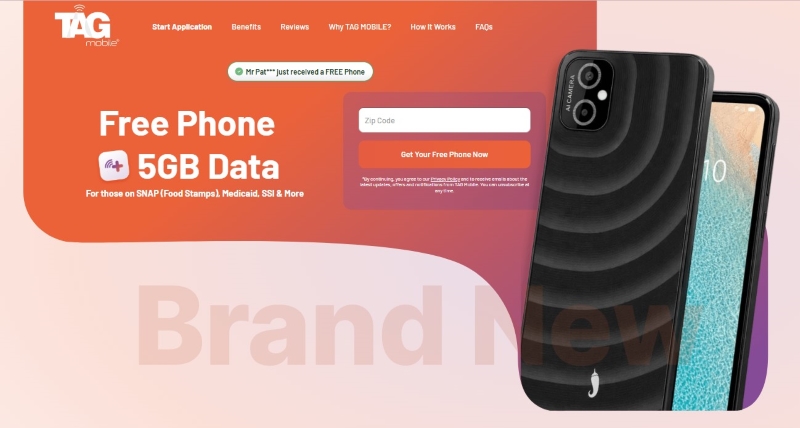
Applying for a free phone and Lifeline service through TAG Mobile is straightforward:
- Verify your eligibility: Qualify through household income or participation in an approved assistance program before starting the application.
- Enter your ZIP code: Visit the TAG Mobile website and enter your ZIP code to confirm that Lifeline-supported service and any available device offers are available in your area.
- Review your options: Browse the available Lifeline plan and, if eligible, select a free or discounted phone offered for your location.
- Complete the application: Enter the required personal information, choose your eligibility method, and review your application details.
- Upload supporting documents: Provide proof of eligibility, income, identity, or address if additional verification is required.
- Submit your application: After submitting, TAG Mobile will review your information and may request additional documentation if needed.
- Receive approval and activate: Once approved, eligible devices are typically shipped within 7-10 business days, depending on availability. Follow the provided instructions to activate your Lifeline-supported wireless service or your new device.
Note: Eligibility varies by state and program. Offers depend on availability and qualifications. TAG Mobile operates under the federal Lifeline Program as an Eligible Telecommunications Carrier (ETC). Service is non-transferable and limited to one service per household.
5. Frequently Asked Questions About Study Cafés
Choosing the right café for studying often depends on timing, comfort, noise level, and the type of work you need to complete. These common questions can help you plan a more productive session without overstaying or arriving unprepared.
What Are the Best Cafes for Studying NYC?
New York City offers plenty of study-friendly cafés, especially in neighborhoods with spacious seating, Wi-Fi, and calmer daytime hours. Searching for the best cafes for studying near me can help you compare nearby options based on distance, opening hours, outlets, reviews, and current crowd levels before heading out.
How long is it acceptable to study in a café?
Two to four hours is generally reasonable when the café is not crowded, and you continue purchasing something occasionally. During busy periods, be considerate of limited seating and avoid occupying a large table alone for an extended time.
Is Starbucks a good place to study?
Starbucks can work well for studying because many locations provide Wi-Fi, seating, drinks, and a casual environment. However, noise levels, available outlets, and table space vary significantly by location, so quieter branches are usually better for focused sessions.
What should you bring to a study café?
Bring your laptop or tablet, charger, headphones, notebooks, pens, and any materials needed for your planned tasks. A portable power bank can also be useful when outlets are unavailable, while headphones help reduce distractions in busier cafés.
Final Words
Choosing the best cafes for studying comes down to finding a space that matches your concentration style, schedule, and study needs. Comfortable seating, manageable noise, Wi-Fi, and accessible outlets can make longer sessions more productive.
When studying beyond home, mobile access also keeps coursework and messages close at hand. Eligible students and households can explore Lifeline-supported service options through TAG Mobile.
- Share This:
-

-

-

-

-


About the author
